This is a development portal. For the live portal: www.mycoportal.org
Contact help@mycoportal.org for assistance.
Crowd Sourcing: Get Involved!
We need your help in advancing this project! Follow the instructions below to join the crowd sourcing effort:
|
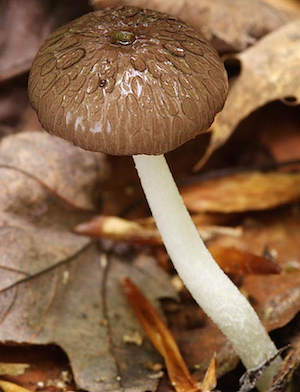
Fungi with conspicuous spore-bearing structures are commonly known as macrofungi (e.g., mushrooms, boletes, puffballs, club fungi, morels, stink horns, truffles, and cup fungi). The Macrofungi Collection Consortium (MaCC) is an NSF funded project that unites collections of macrofungi (currently 38 participating institutions) to digitize specimen information. This information documents the diversity and distributions of macrofungi in North America since fungal specimens were first deposited in U.S. fungaria in the 1800's. Since its beginning, the MaCC project has made over 1.5 million records of macrofungi available online through mycoportal.org, the project's data portal. Thousands of specimen label images are found among these records, and large numbers of these have not been completely transcribed. We need your help in making data from these specimens fully available. In transcribing data from fungal specimen labels, you are part of a larger effort documenting fungal diversity in North America. If you'd like to help in this effort, follow the directions below to start transcribing, or follow the links here to start transcribing for the New York Botanical Garden (NY), the Farlow Herbarium (FH; Harvard), or the University of Michigan (MICH). Image credits: Mushroom images on this page were provided by R. Lebeuf. |
|
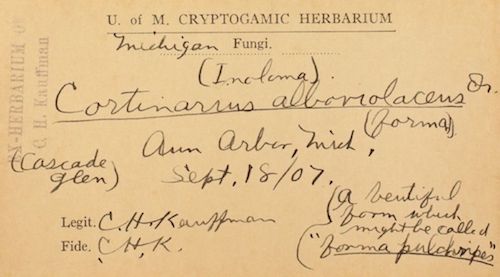
The image to the right is a label from a fungal specimen collected by Calvin Henry Kauffman, an early American mycologist. Fungal specimen labels such as this contain a few basic types of data, including the name of the fungal species (i.e., Cortinarius alboviolaceus), the collection locality (i.e., USA, Michigan, Ann Arbor, Cascade Glen) and date (i.e., September 18th, 1907), the collector/s (i.e., C.H. Kauffman), as well as notes (i.e., A beautiful form which might be called "forma pulcheripes”). Other types of information about where the specimen was collected (e.g., the substrate the fungus was growing on and/or the habitat in which the specimen was found) may also be included. |
|
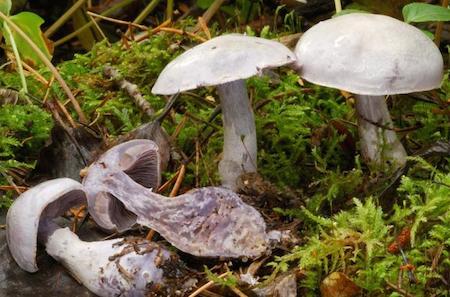
Field image: Cortinarius alboviolaceus fruiting bodies collected as a specimen. |
In order to start transcribing, you will need to create a mycoportal.org login (click here to create login). You will be assigned points for each fungal specimen record that you transcribe, and you can track your points on the Crowdsourcing Score Board (follow the ‘Crowd Source: Score Board’ links from the navigation bar). The top scorers will be listed along with statistics documenting their efforts as well as progress made collectively by ‘crowdsourcers’, such as yourself, in completing datasets from particular institutions. You will need to be logged into the portal whenever you are working on completing records. Once logged into the portal, you are ready to start transcribing. From the Score Board, click on the ‘Open Records’ to work on record sets from your preferred institution or follow the links above to work on sets from specific institutions (e.g., FH, MICH, or NY). |
|
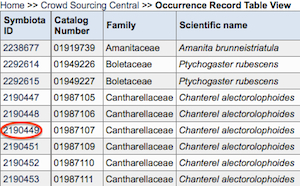
Once selecting a record set to work on, you will see a series of records from a given institution that need to be completed. In order to start transcribing a label to complete the specimen record, click on the corresponding 'Symbiota ID' (e.g., the ID '2190449' circled in red in the image to the right for a specimen record of Chanterel alectorolophoides, an older name for Cantharellus cibarius). Clicking on this ID link will take you to an editing page where you can enter data as you transcribe the specimen label from an image of the label that will appear on the editing page to the upper right (see image below). |
 |
|
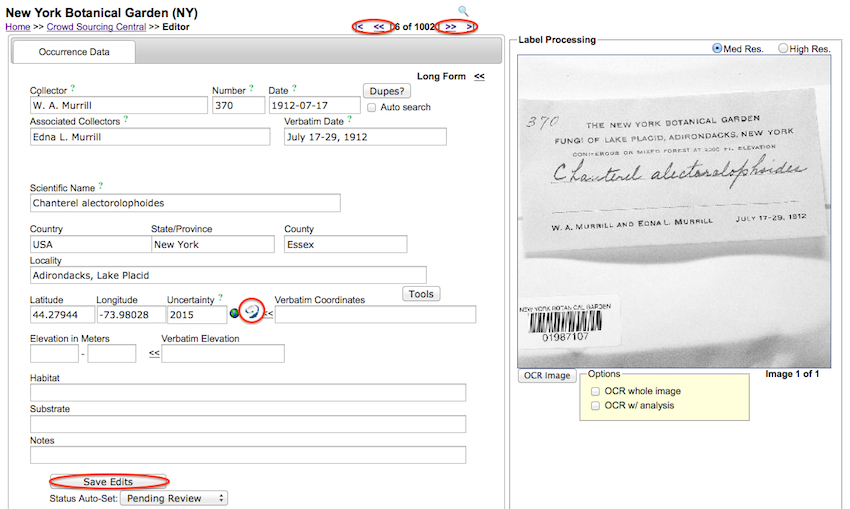
Don't forget to click on 'Save Edits' button (circled in red at the bottom of the editing page in the image below) once you have finished transcribing the label for a particular specimen record (Note - transcribed data entered and saved will not appear on mycoportal.org records until it has been approved by the corresponding institution's collection manager). If the record is too difficult to transcribe, simply move on to the next record by clicking on the record navigation arrows (circled in red at the top of the editing page in the image below). Detailed notes on transcribing, including how to zoom in on elements in the image label, are provided below. Click on these links to learn more about the institutions making their data available for crowdsourcing:
The New York Botanical Garden(NY; William and Lynda Steere Herbarium)
The Farlow Herbarium (FH; Harvard University) The University of Michigan Herbarium (MICH) |
|
|
Notes on transcribing specimen data from a label image:
- Position Label and Enlarge View: The label can be positioned in the 'Label Processing' image frame by
holding down the 'command' button, placing the cursor over the image, and holding and moving the cursor to place the label in the desired position.
To enlarge the label view, the image frame can be widened by clicking and dragging on the right border. |